Catalog
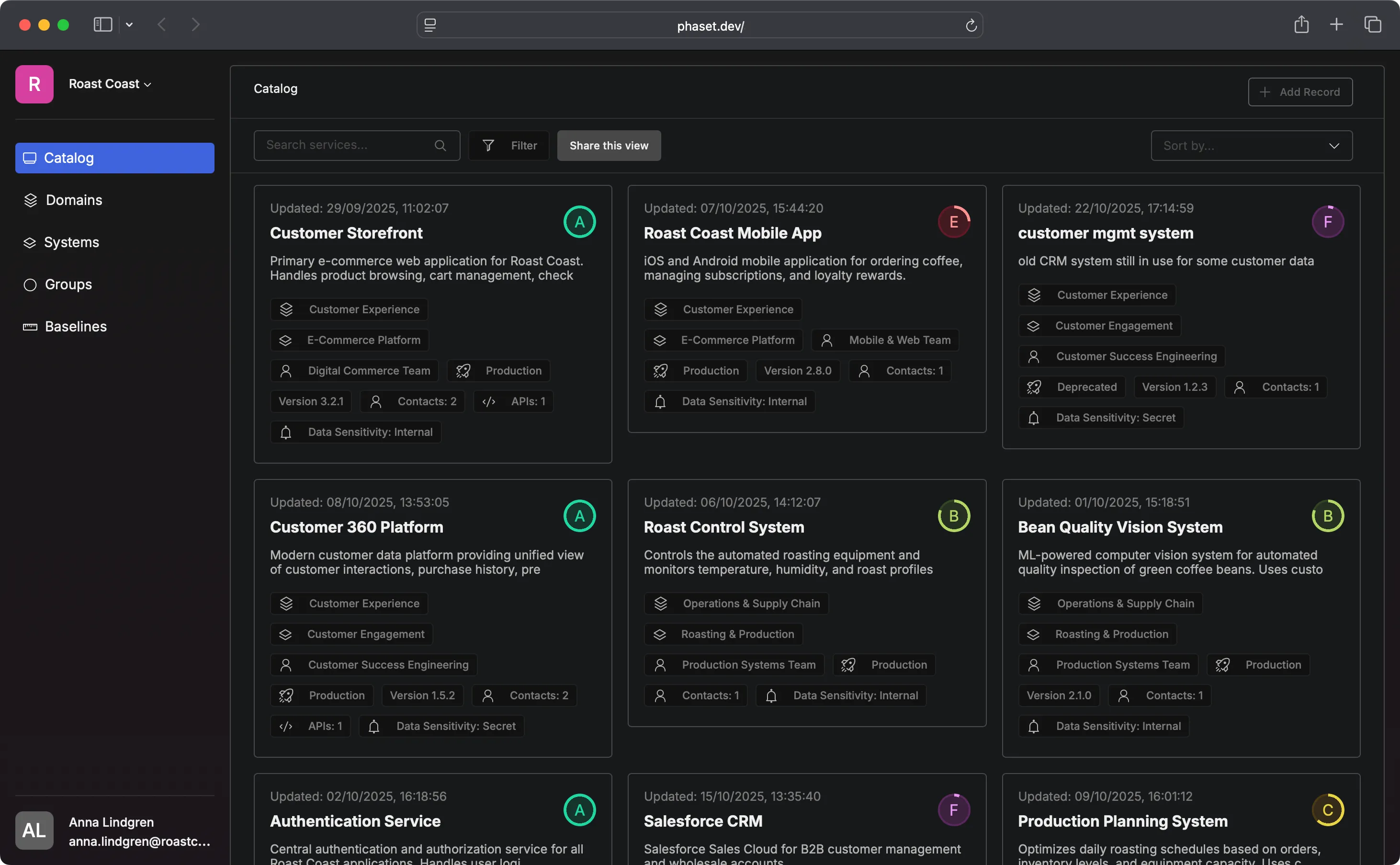
The Catalog is your organization’s central inventory of software. Every Record—services, APIs, components, tools—lives here. It’s automatically updated as Records are created, modified, or removed, giving you a real-time view of your entire software landscape.
Why the Catalog Matters
Section titled “Why the Catalog Matters”It makes the invisible visible. Most organizations don’t have a complete picture of their software. Services get built, forgotten, duplicated. The Catalog fixes this—everything is documented and discoverable. Need to assess blast radius for a migration? Understand dependencies before a refactor? Find all services using a deprecated library? The Catalog makes these questions answerable.
The Catalog makes workflows like filtering by Domain to see business areas a cinch. Filter by Group to see team ownership. Filter by health score to find problems. Search by technology stack. Sort by last updated. The Catalog shows what you need, when you need it. Records update automatically via CI/CD integration. This means no manual inventory spreadsheets, no stale wikis—the Catalog reflects reality because it’s driven by your actual workflows.
Working with the Catalog
Section titled “Working with the Catalog”The Catalog supports two management approaches:
Manual management: Create and update Records directly in the UI. Good for:
- Getting started quickly
- Managing external/third-party software
- Small teams or simple setups
Automated management: Records update via CI/CD when your manifest file changes. Good for:
- Keeping documentation in sync with code
- Scaling across many services
- Ensuring consistency through automation
Most organizations will use both: automation for their own services, manual entry for third-party tools and external dependencies.
Filtering and Organizing
Section titled “Filtering and Organizing”The Catalog’s power comes from filtering and organizing Records:
Filter by metamodel:
- Domain: What business area? (E-commerce, Analytics)
- System: What capability? (Checkout Flow, User Management)
- Group: Who owns it? (Platform Team, Data Engineering)
Filter by attributes:
- Lifecycle stage (Development, Production, Deprecated)
- Health score (Healthy, Needs Attention, Critical)
- Technology (Python, Node.js, Go)
- Last updated (Find stale Records)
Search: Find Records by name, description, or metadata
Sort: By name, health score, last update, or criticality
Combine filters to answer specific questions: “Show me all Production services owned by the Platform Team with health scores below 70.”
Getting Started
Section titled “Getting Started”- Create your first Records manually through the UI (start with 3-5)
- Explore filtering to see how Records can be organized
- Set up automation for services you actively maintain
- Add more Records as you discover software in your organization
- Use the Catalog regularly for impact analysis, planning, and discovery
The Catalog grows more valuable as it becomes more complete. Start small, expand steadily, and let it become your team’s source of truth for software inventory.