Health Score
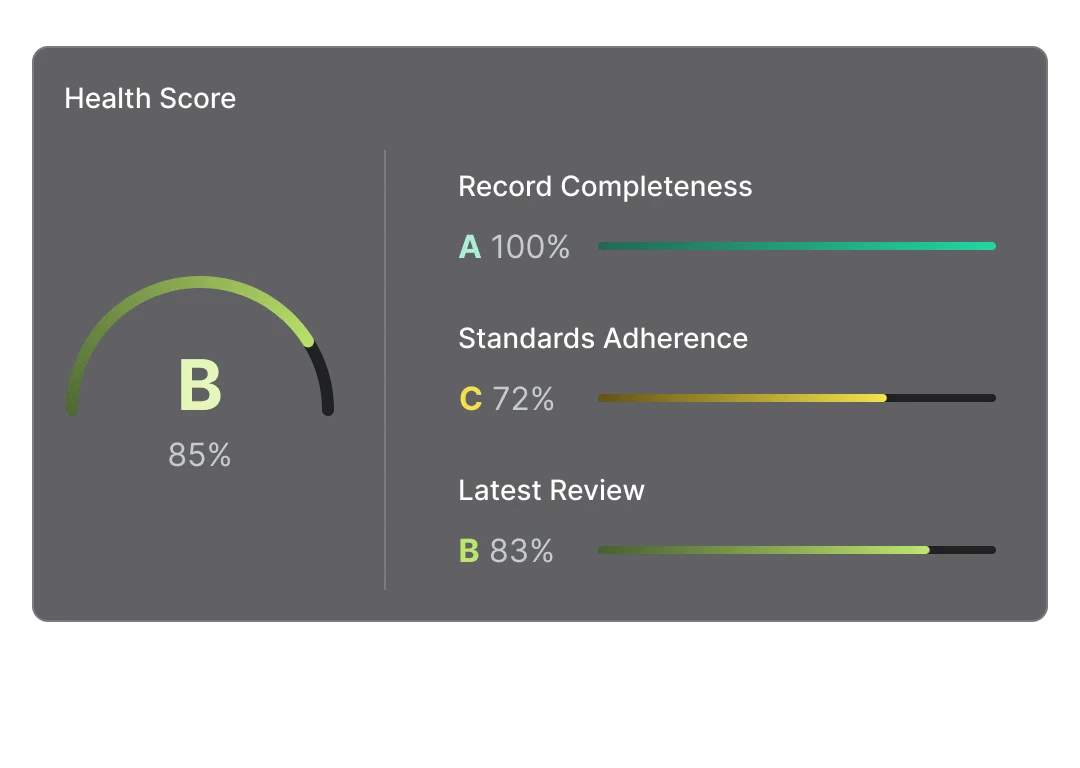
The Health Score distills complex information about your software into a single, actionable metric. It answers the question: “How healthy is the software represented by this Record?”
Instead of juggling multiple dashboards and metrics, you get one score that combines technical standards, documentation completeness, and operational maturity.
Why Health Scores Matter
Section titled “Why Health Scores Matter”They make quality visible. A score of 45 tells you something’s wrong. A score of 92 tells you it’s in great shape. No ambiguity, no interpretation needed. With 100 services, where do you focus improvement efforts? Sort by Health Score—lowest scores need attention first. Is your tech debt improving or worsening?
Health Scores show the current state. If scores are declining, your processes need adjustment. When health is measured, teams pay attention to it. Health Scores create visibility that motivates improvement.
How Health Scores Work
Section titled “How Health Scores Work”Health Scores combine three dimensions of software quality.
1. Standards Adherence: Does the software follow your organization’s Baseline requirements?
- README, tests, CI/CD configuration present
- Code quality checks passed
- Documentation complete
2. Record Completeness: Is the Record fully documented?
- All required fields filled in
- Dependencies mapped
- Ownership defined
- SLOs documented
3. Review Score: How does the software perform in quality Reviews?
- Architecture soundness
- Development practices
- Operational maturity
The final Health Score is calculated as:
Health Score = (Standards + Completeness + Review) / 3Each dimension contributes equally, ensuring balanced attention across technical standards, documentation, and operational practices.
Understanding Grades
Section titled “Understanding Grades”Scores translate to letter grades for quick assessment:
| Grade | Score | Meaning |
|---|---|---|
| A | 90+ | Excellent - exemplar for others |
| B | 80+ | Good - minor improvements needed |
| C | 70+ | Acceptable - some gaps to address |
| D | 60+ | Poor - needs attention |
| E | 40+ | Critical - significant issues |
| F | 1+ | Failing - immediate action required |
| — | 0 | No data - not yet assessed |
Use grades for quick visual scanning in the Catalog. Use raw scores for detailed analysis and tracking improvements.
Health Scores in Practice
Section titled “Health Scores in Practice”Use them for:
- Prioritizing work: Focus on lowest-scoring critical services first
- Release decisions: “Don’t deploy services with Health Score < 70”
- Team goals: “Improve average Health Score by 10 points this quarter”
- Visibility: Show executives a simple metric for software quality
Don’t use them for:
- Individual performance: Health Scores measure software, not people
- Blame: Low scores indicate improvement opportunities, not failures
- Gaming: Optimizing for the score instead of actual quality defeats the purpose
Health Scores are diagnostic tools, not report cards. Use them to guide improvement, not to punish teams.
Getting Started
Section titled “Getting Started”- Ensure Records have basic documentation (name, owner, description)
- Run Standards checks to establish the Standards dimension
- Complete Record fields to improve Completeness
- Run initial Reviews for mature services
- Check Health Scores and identify improvement priorities
As you fill in more information and run more checks, Health Scores become more accurate and useful. They’re most valuable when calculated consistently across all Records.