Reviews
Reviews in Phaset are structured assessments that help teams reflect on how well their software is built, deployed, and maintained. Think of them as lightweight architecture reviews or operational health checks—but designed to spark conversation, not create bureaucracy.
Each Review consists of 30 questions across three areas:
- Architecture: Is the design sound and sustainable?
- Development: Are we following good practices?
- Operations: Can we run this reliably?
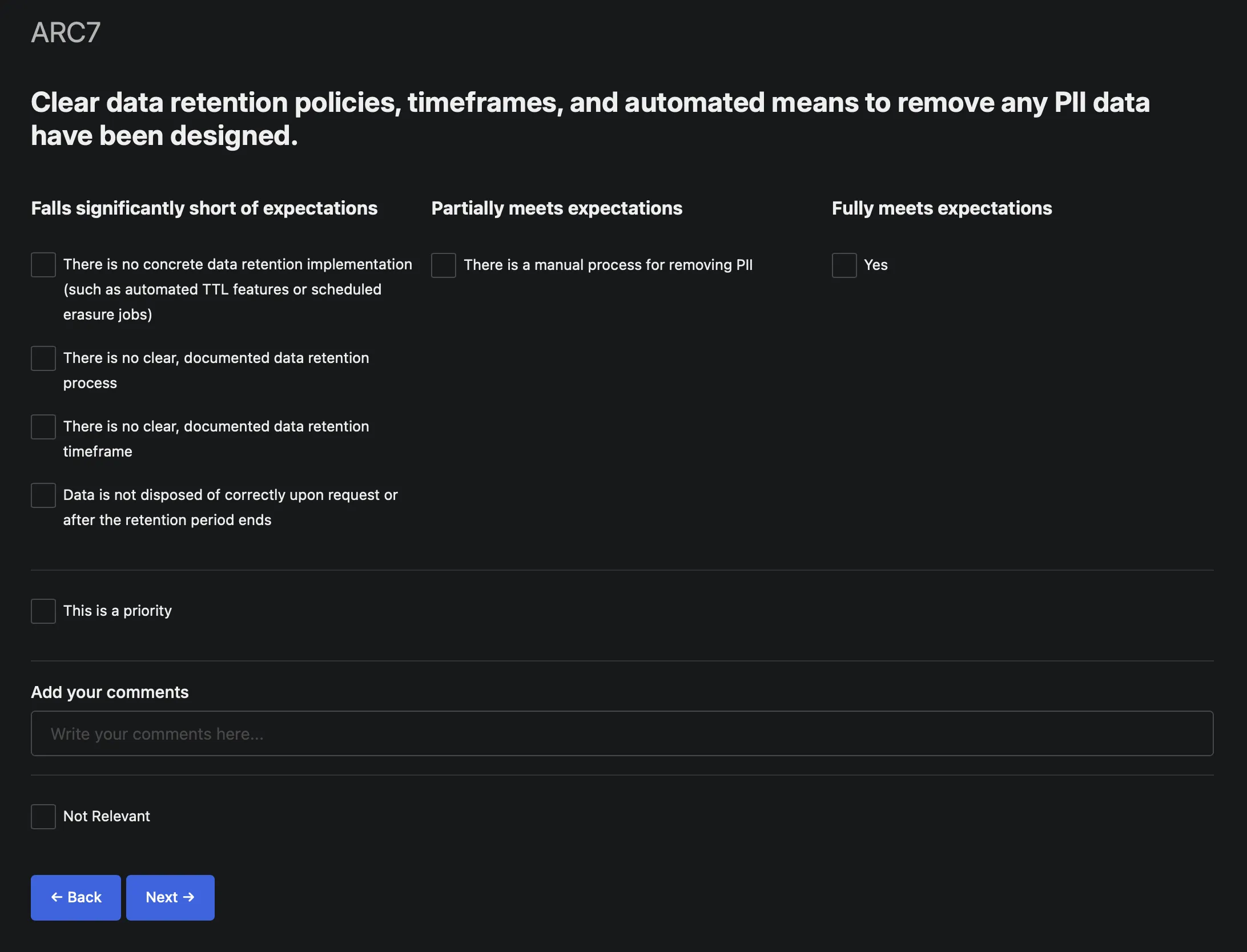
Reviews are presented as seen below.
Why Reviews Matter
Section titled “Why Reviews Matter”They surface what’s invisible, which in software, is most of it. Tech debt, operational risks, and architectural issues don’t announce themselves. Reviews create a structured moment to acknowledge what everyone knows but hasn’t said out loud.
By marking answers as “prioritized” or documenting next steps, Reviews turn awareness into accountability. They’re not just diagnostics—they’re planning inputs. Regular Reviews normalize talking about trade-offs, risks, and improvements. Quality becomes a team conversation, not a manager mandate.
How Reviews Work
Section titled “How Reviews Work”Reviews are per-Record—each service, component, or system gets its own assessment. This matters because different software has different risk profiles and teams can prioritize Reviews for critical systems.
The Review Process:
- Run a Review for a Record (takes ~30-60 minutes)
- Answer the 30 questions honestly—these are conversation starters, not audits
- Mark priorities for items needing attention
- Add commentary to capture context, decisions, or action items
- Track over time to see if things are improving
The Three Areas
Section titled “The Three Areas”Architecture Questions
Section titled “Architecture Questions”These explore design decisions, dependencies, data ownership, and long-term sustainability:
- Is the service boundary well-defined?
- Are dependencies manageable and documented?
- Can this evolve without major rewrites?
What they reveal: Architectural debt, coupling issues, scalability concerns
Development Questions
Section titled “Development Questions”These assess code quality, testing, documentation, and development practices:
- Is the code maintainable by the team?
- Do we have adequate test coverage?
- Is documentation current and useful?
What they reveal: Code health, testing gaps, onboarding friction
Operations Questions
Section titled “Operations Questions”These examine reliability, observability, incident response, and operational maturity:
- Can we detect and diagnose problems quickly?
- Is deployment safe and repeatable?
- Do we understand our failure modes?
What they reveal: Operational risk, monitoring gaps, deployment confidence
Reviews vs Audits
Section titled “Reviews vs Audits”Reviews are not audits. Key differences:
| Reviews | Audits |
|---|---|
| Team-driven | Externally imposed |
| Conversation starters | Compliance checkboxes |
| Focus on improvement | Focus on conformance |
| Flexible priorities | Fixed standards |
| Continuous practice | Periodic event |
Reviews assume teams want to improve and just need structure to have the conversation. Audits assume teams won’t improve without external pressure.
Using Reviews Effectively
Section titled “Using Reviews Effectively”Run Reviews regularly: Quarterly or semi-annual Reviews create rhythm without being burdensome. For critical systems, consider monthly Reviews.
Be honest: Reviews only help if you’re truthful. If something’s a problem, mark it as a problem. The point isn’t to score well—it’s to surface reality.
Mark priorities, not everything: You can’t fix everything at once. Use the “prioritized” flag to highlight what matters most. Leave less critical items as “noted but not urgent.”
Add context: The commentary field is valuable. Explain why something is an issue, what the plan is, or why you’re deferring action. Future you (or new team members) will thank you.
Review together: While individuals can complete Reviews, discussing them as a team is where the real value emerges. Different perspectives surface different concerns.
Track trends: Run the same Review periodically and compare results. Are things improving? Getting worse? Holding steady? Trends tell you if your efforts are working.
What to Do with Review Results
Section titled “What to Do with Review Results”Reviews generate insights, not mandates. What you do with them is up to you:
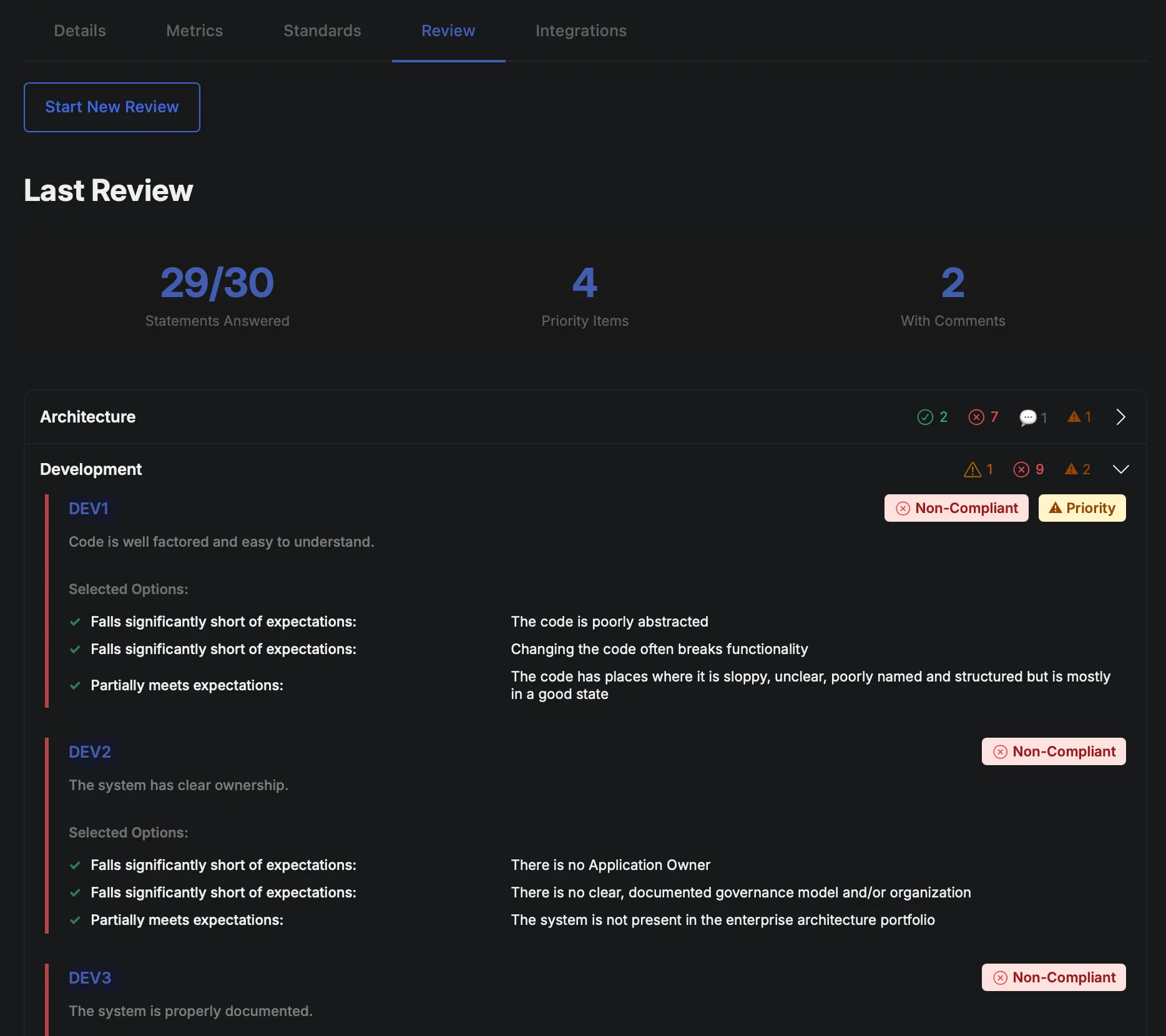
Short term:
- Create tickets for prioritized issues
- Schedule dedicated time to address tech debt
- Update documentation for knowledge gaps
Medium term:
- Plan architectural improvements
- Invest in missing tooling or infrastructure
- Improve development practices
Long term:
- Track patterns across Reviews to identify systemic issues
- Use Review data to justify staffing or budget requests
- Build a culture where quality is continuously discussed
Getting Started
Section titled “Getting Started”- Pick a Record (start with something you know well, not your most critical system)
- Run your first Review (takes 10-15 minutes)
- Discuss results with your team
- Mark a few priorities and create tickets
- Schedule the next Review (in 3-6 months)
- Expand gradually to more Records
Reviews won’t magically fix problems. But they will make problems visible, create space to discuss them, and establish a rhythm of continuous improvement.
That’s often the missing ingredient: not knowing what to improve (teams usually know), but creating the structure to actually talk about it and do something about it.
Reviews are that structure.