Your First Record
This tutorial walks you through creating your first Record in Phaset. You’ll learn both manual and automated approaches, so you can choose what works best for your workflow.
What you’ll accomplish
Section titled “What you’ll accomplish”By the end of this tutorial, you’ll have:
- Created a Record representing a piece of software
- Understood the difference between manual and automated lifecycle management
- (Optional) Set up automated updates via CI/CD
Prerequisites
Section titled “Prerequisites”- Phaset installed and running
- Access to your Phaset organization
- (For automation) A Git repository with CI/CD capabilities
Step 1: Choose your lifecycle approach
Section titled “Step 1: Choose your lifecycle approach”Records in Phaset can be managed in two ways:
Manual lifecycle: You update Record information directly through the Phaset web application. Best for getting started, external tools, or SaaS products you don’t control.
Automated lifecycle: Record information lives in a phaset.manifest.json file in your Git repository and updates automatically via CI/CD. Best for custom-developed software where you want automation.
Step 2: Create your first Record
Section titled “Step 2: Create your first Record”- Log into Phaset and navigate to the Catalog view.
- Click Create Record. Give it a name, then create it.
- Click Edit Record.
- Fill in any additional basic information:
- Description: Brief description of what this software does
- Kind: Select the type (service, library, website, etc.)
- Lifecycle stage: Current stage (production, development, etc.)
- Add ownership information:
- Owner email: The primary person or team responsible
- Relation: Set to “owner”
- (Optional) Add additional context:
- Tags: Keywords for easy searching
- Links: Documentation, dashboards, or related URLs
- System/Domain/Group: Organizational structure
- Click Save or Create.
You’re done! Your first Record is now visible in the Catalog. You can update it anytime by clicking into the Record and editing fields directly.
-
In your Git repository, create a file named
phaset.manifest.jsonat the root level. -
Either follow the tip above and copy the data you entered in the manual lifecycle demonstration or add a basic Record structure:
{ "spec": { "name": "Payment API", "repo": "myorg/payment-api", "description": "Handles payment processing for our platform", "lifecycleStage": "production", "version": "1.0.0", "kind": "service", "group": "Platform Team", "system": "Payment System", "domain": "Financial Services", "dataSensitivity": "sensitive", "businessCriticality": "high" }, "contacts": [ { "relation": "owner" } ], "tags": [ "payments", "critical" ], "links": [ { "url": "https://docs.example.com/payment-api", "title": "Documentation", "icon": "docs" } ]}- Commit this file to your repository.
- Log into Phaset and navigate to the Catalog view.
- Click Create Record.
- Click the Integrations tab.
- Phaset will display:
- Your Organization ID
- The Record ID for this Record
- An API token that is unique for this Record
- Save these credentials securely—you’ll need them for CI/CD setup.
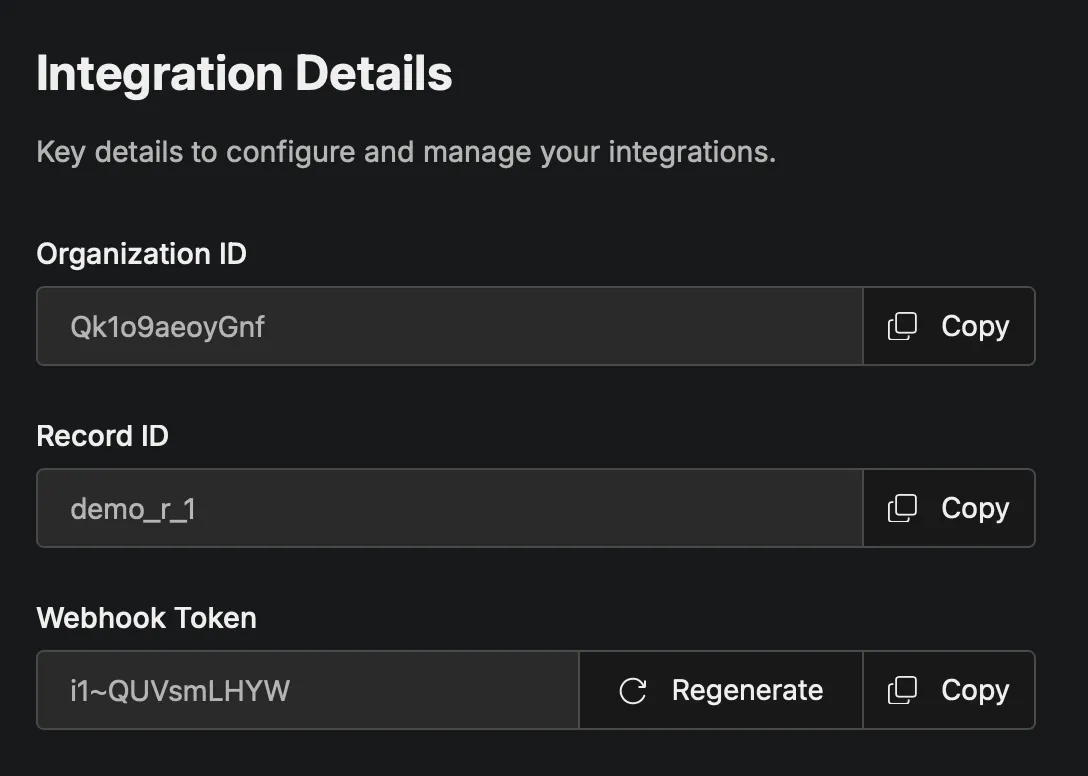
Next: Set up your CI/CD integration to automatically sync changes. See Step 3 below.
Step 3 (Optional): Automate updates via CI/CD
Section titled “Step 3 (Optional): Automate updates via CI/CD”It’s time to set up CI/CD to push updates automatically to Phaset.
-
In your GitHub repository, go to Settings > Secrets and variables > Actions.
-
Add these secrets:
PHASET_ENDPOINT: Your Phaset URL (e.g.,https://your-phaset-api.com)PHASET_API_KEY: Your record’s API token from Step 2PHASET_RECORD_ID: Your Record IDPHASET_ORG_ID: Your Organization ID
-
Create
.github/workflows/phaset.ymlin your repository:
name: Update Phaset
on:  push:    branches: [main]
jobs:  phaset:    runs-on: ubuntu-latest    steps:      - name: Checkout        uses: actions/checkout@v5
- name: Update Phaset Record uses: phasetdev/phaset-action@v1 with: endpoint: ${{ secrets.PHASET_ENDPOINT }} api-key: ${{ secrets.PHASET_API_KEY }} record-id: ${{ secrets.PHASET_RECORD_ID }} org-id: ${{ secrets.PHASET_ORG_ID }}- Commit and push this workflow file.
- The workflow will run automatically on the next push to
main, updating your Record in Phaset.
-
In your GitLab project, go to Settings > CI/CD > Variables.
-
Add these variables:
PHASET_ENDPOINT: Your Phaset URLPHASET_API_KEY: Your record’s API token from Step 2PHASET_RECORD_ID: Your Record IDPHASET_ORG_ID: Your Organization ID
-
Create
.gitlab-ci.ymlin your repository:
image: node:latest
phaset: stage: deploy script: - curl -Lso phaset.sh https://raw.githubusercontent.com/phasetdev/phaset-action/main/phaset.sh - bash ./phaset.sh --org-id "${PHASET_ORG_ID}" --record-id "${PHASET_RECORD_ID}" --token "${PHASET_API_KEY}" --endpoint "${PHASET_ENDPOINT}" --action "record" only: - main- Commit and push this file. The pipeline will run on the next push to
main.
For other CI/CD platforms, you can use the Phaset shell script directly:
curl -Lso phaset.sh https://raw.githubusercontent.com/phasetdev/phaset-action/main/phaset.shbash ./phaset.sh \ --endpoint "YOUR_ENDPOINT" \ --token "YOUR_API_KEY" \ --record-id "YOUR_RECORD_ID" \ --org-id "YOUR_ORG_ID" \ --action "record"Configure your CI/CD tool to run this script when changes are pushed to your main branch.
Step 4: Verify your Record
Section titled “Step 4: Verify your Record”- Navigate to the Catalog in Phaset.
- Find your newly updated Record (use search or filters if needed).
- Click on the Record to view its details.
- Verify that all information appears correctly.
For automated Records, make a small change to phaset.manifest.json, commit it, and verify that Phaset updates automatically after your CI/CD runs.
What’s next?
Section titled “What’s next?”Now that you have your first Record, consider:
- Create more Records: Document your entire software landscape for complete visibility.
- Learn about metamodeling in Phaset: Extend your Records with powerful, yet simple, metamodeling to represent your Domains, Systems and Groups.
- Define Baselines: Set organizational standards that Records should meet. See the Baselines guide.
- Set up Metrics: Configure webhooks to track DORA metrics and engineering productivity. See the Integration guide.